
Unsubscriptions
Prisma tracks two distinct ways a customer can stop receiving a communication: unsubscriptions and dismisses.
An unsubscription is a deliberate opt-out from a channel or category. It is permanent until manually reversed. Prisma enforces it automatically: a customer unsubscribed from email will not receive email messages from any campaign, regardless of what segment they belong to.
A dismiss is a softer signal — the customer closed or dismissed a campaign without opting out permanently. Dismisses reset automatically after 3 months, after which the customer becomes eligible to receive that campaign again. You can see both on the Unsubscriptions & Dismisses tab of any customer profile.
Types of unsubscriptions
By channel
A customer can unsubscribe from a specific channel — email, SMS, or push notifications — independently. For example, a customer might unsubscribe from SMS while remaining reachable via email.
By campaign category
If you use Campaign Categories, customers can also unsubscribe from a specific category (e.g. “Promotional offers”) while remaining subscribed to others (e.g. “Account alerts”). This gives customers more control and typically reduces full opt-outs.
By group
If you use Groups within a category, customers can unsubscribe at the group level — more granular than a full category opt-out.
By campaign
A customer can be opted out of a single specific campaign without affecting their subscription to the channel or category it belongs to.
How unsubscriptions happen
Via the unsubscribe link in a message — when you include an unsubscribe link in an email or SMS template, clicking it automatically marks the customer as unsubscribed from that channel or category.
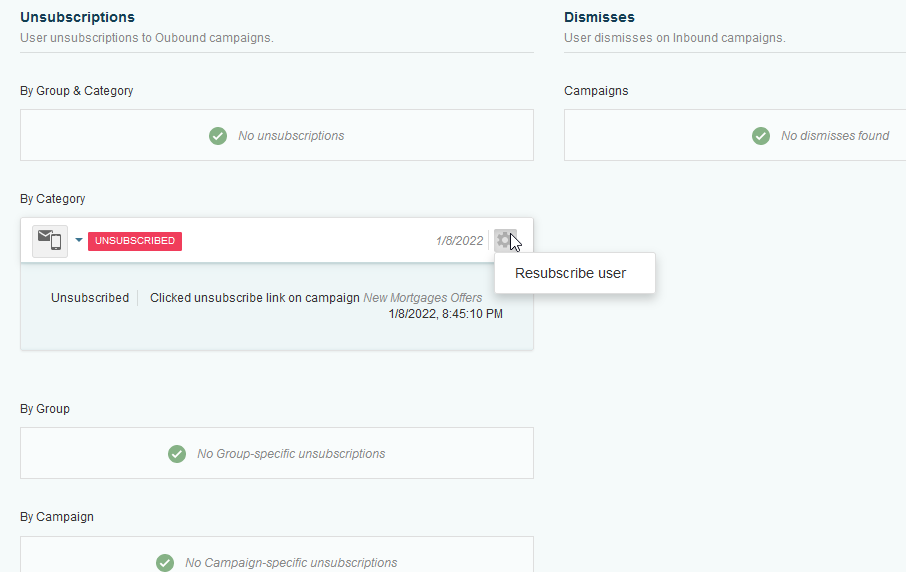
Manually in the customer profile — go to Customers > find the customer > open their profile > Unsubscriptions & Dismisses tab. From there you can add or remove unsubscriptions for any channel, category, group, or campaign:

You can also enable or disable specific outbound channels for a customer directly from this tab:

Via bulk import — if you have a list of unsubscribed customers from an external system (e.g. from migrating from another platform), you can import it using the unsubscriptions import tool. See Importing Unsubscriptions from an External System.
Viewing unsubscriptions globally
To see all customers who have opted out, go to Customers > Unsubscriptions. You can filter by channel or category and export the list.
Re-subscribing a customer
If a customer wants to opt back in, you can remove their unsubscription record manually from their profile. There is no automatic re-subscription — it always requires a manual action.
Keep in mind that re-subscribing a customer who opted out may have legal or compliance implications depending on your region. Consult your compliance team before doing so.
 Related Articles
Was this article helpful?
On this page