
Eltropy (SMS)
If you need to engage your customers directly on their mobile devices in a personalized manner, Prisma Campaigns enables you to reach them via SMS. Leveraging SMS along with communication policies is a highly effective strategy to connect with a broad audience, enhancing engagement and conversion rates.
Setting up Eltropy
Eltropy is a secure messaging platform that enables financial institutions to communicate with customers via SMS and other channels. Signing up requires a subscription, but you can request a demo to evaluate the platform. Once done, you can set up Eltropy as your SMS delivery channel and start sending messages by following these steps:
-
Ask your Eltropy representative for the following API credentials:
- Service URL: the base URL of your Eltropy API service (for example,
https://service-url.uateltropy.com). - Client ID and Client Secret: the API client credentials issued for your institution.
- Authorization Token: the token Prisma Campaigns uses to authenticate every request to Eltropy.
- Text Profile ID: the Eltropy text profile your messages are sent from. The sender of each SMS is determined by this profile.
- Service URL: the base URL of your Eltropy API service (for example,
-
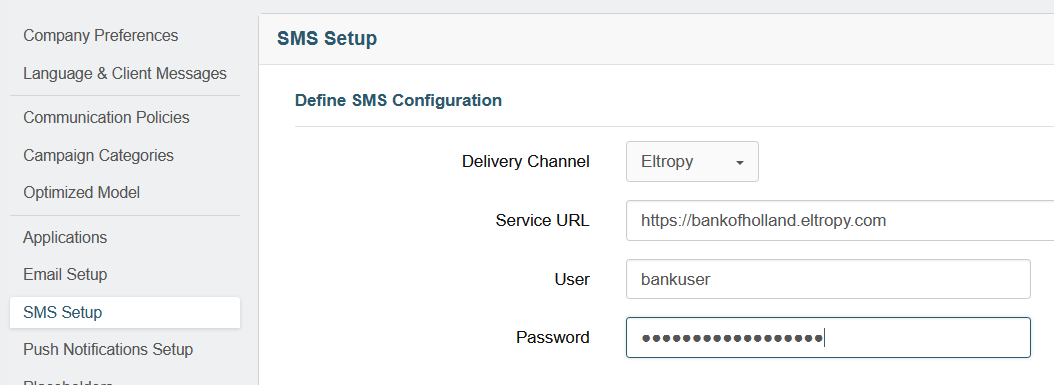
In Prisma Campaigns, go to Settings/SMS Setup and choose Eltropy in the Delivery Channel dropdown. Then enter the Service URL, Client ID, Client Secret, Authorization Token, and Text Profile ID in the corresponding fields. All five fields are required:
-
Under Origin Numbers, type the phone number associated with your Eltropy text profile (including the country code, for example
+15551234567) and click Add. This number is required to send a test message. -
Click Save to finish the configuration.
-
Optionally, click Test SMS to validate the channel. Choose the From number, enter a To (cellphone number) and a Message, and click Send Test. The test always uses the last saved SMS configuration, so make sure you save your changes first.
Delivery status
Eltropy reports each message’s delivery status (delivered or failed) back to Prisma Campaigns through webhooks. If a message fails because the recipient opted out, Prisma Campaigns automatically marks that number as unsubscribed so it won’t be contacted again. To enable these delivery status notifications for your company, contact your Prisma Campaigns representative.
Besides Eltropy, Prisma Campaigns allows using Twilio, Amazon, POSta, Infobip and other alternatives as SMS providers.
Once the procedure is complete, you can start using this channel to contact your customers. To do so, go to Adding SMS Content for further instructions.
 Related Articles
Was this article helpful?
On this page